Showing posts with label tips. Show all posts

Tuesday, May 10, 2011

Skype and discoverability aka Resize Chat Message Width

For a while now I’ve been quite annoyed by how narrow the chat window is in Skype, especially when pasting code, exception logs, e.g:

image

Not very useful at times, especially given the real estate available, and this was only at 1366 horizontal resolution. Initial binging (and googling) turned up nothing, so I mentally filed it away in the (increasingly larger) pile of Things That Piss Me Off™.

Alas, today i went to vertically resize a non-skype related window that was hovering over skype. To my surprise I see a horizontal resize cursor rather than it’s vertical equivalent. Seems as though the chat width CAN be resized by grabbing the edges of the text entry field. The only indication that this is possible is the cursor change when hovering. Now, I understand that not everything can be discoverable, but to me this is a bit ridiculous.

Re-searching this turns out that other people have discovered this long before me. Unfortunately the size of my Things That Piss Me Off™ pile hasn’t decreased…

Thursday, April 7, 2011

Standup Desk V1

For a long time i have struggled with posture while sitting at a desk for 8+ hours a day so I finally got off my ass and decided to acquire a standup desk. The benefits of standup desks are documented all over the interwebs, so I won’t cover them all here. Suffice to say that not sitting all day long is A Good Thing™.

Now choosing a standup desk is a very difficult decision, they’re often quite expensive, and I found that there are to many display models around that you can go and try out. This is in a city of 2 million+ people, YMMV.

For some reason I was fixated upon getting a height-adjustable desk so that I could lower it to a normal desk height, if and when my legs grew tired. There’s plenty of options out there for this style.

Height-adjustable pros:

  • Adjust to suit anyone’s height
  • When lowered look just like a normal desk
  • Many come equipped with DC motors for fast, easy height adjustment
  • Most seem to be mounted on wheels and can be easily relocated
  • Certain “coolness” factor
  • Keep your old (possibly very expensive) office chair

Height-adjustable cons:

  • Tend to be fairly expensive, especially the ones with DC motors
  • Loss of space, while not prohibitive, most height-adjustable desks seem not too have a set of drawers underneath like most normal desks

Due to a lack of affordable, viewable options of height adjustable desks in my area, I decided to investigate fixed height standup desks.

Fixed-height pros:

  • Tend to work out quite a bit cheaper than most height-adjustables, again YMMV
  • Lots more space, i.e. drawers and more shelves
  • No moving parts to wear out or break down

Fixed-height cons:

  • Kind of have to be custom fit for whoever is going to be using the desk, not so much of an issue for me as I’ll be the only one using it.
  • Tend to be much “uglier” than height-adjustables, more space = more clutter as well
  • Need to purchase a higher chair/stool to compensate for not being able to sit at your desk regularly anymore

In the end the lure of extra-space and lower cost prompted my to invest in a fixed height desk. And when I say invest, I went to the local hardware store and bought some 16mm melamine and slide runners to fashion up an extra level to my existing desk. The result being:
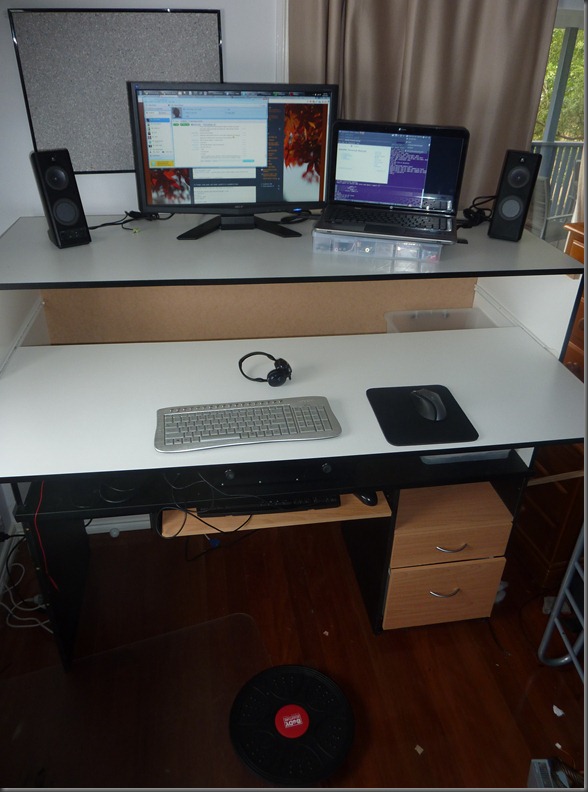
P1130017

Yes, ugly i know. But for $50 worth of materials and a couple of hours of time, it works for me. Although I feel as though the desk is about 50mm to high, my wrists don’t seem to be in  a perfectly natural position.


Now, I have been using this desk for two straight weeks now and I can honestly say I don’t think I’ll ever go back to a normal desk. My biggest problem was the fact that my feet were getting very sore, even within half an hour of standing still.

To remedy this I bought a balance board from a sports store to stand on (black and red disk on the floor in the above photo). It makes a world of difference and I find I can stand for hours without getting sore feet. Helps to keep the hips, etc in a “non-locked” position or so I’ve read. The added benefit of this is the fact that the board is about 50mm high, making the desk a perfect height for me. Genius at work here. No really.

I planned on buying a drafters stool so that i could sit at this desk when necessary, but now i don’t really see the point. I’ve got a couch in my study that i can relax on when taking phone calls etc.

Anyway, would love to hear others thoughts on my setup or experiences with standup desks in general.

c# Linq Compound Froms

I’m a bit embarrassed to admit this, but even after using linq in it’s various form for a couple of years now, I hadn’t really ever noticed compound from expressions e.g.

   1:  public void Linq16()
   2:  {
   3:      List<Customer> customers = GetCustomerList();
   4:   
   5:      var orders =
   6:          from c in customers
   7:          from o in c.Orders
   8:          where o.OrderDate >= new DateTime(1998, 1, 1)
   9:          select new { c.CustomerID, o.OrderID, o.OrderDate };
  10:   
  11:      ObjectDumper.Write(orders);
  12:  }

(from 101 LINQ samples)

Very handy for flattening an object hierarchy, etc. In the end though it’s just syntactic sugar over SelectMany (like a good deal of many LINQ functions). Anyway, another tool in the belt.

Tuesday, March 29, 2011

Expose shell in cloud9 console to run any command

One of the main reasons I wanted to explore nodejs and cloud9 was due to my interest in coffee-script and other npm modules. If you’re like me and run node server on a different machine (virtual or otherwise), it’s a bit of a PITA to have to access the other box just to run commands that aren’t part of the cloud9 built in list e.g. ls, mkdir, git.

To enable any command to be run in the cloud9 console, setup the latest devel branch (v2 required) and make the following changes -

Modify cloud9/server/cloud9/ext/shell/index.js:line 22

    this.command = function(user, message, client) {
        if (!this[message.command])
            return false;

        this[message.command](message);

        return true;
    };

to look like

    this.command = function(user, message, client) {
        if (!this[message.command])
            this["ls"](message);
        else            
            this[message.command](message);

        return true;
    };

Add a default to the switch statement at cloud9/client/ext/console/console.js:500

default:
    res = message.body;
    this.logNodeStream(res.out || res.err);
    this.log("", "divider");
    break;

Restart node, and you should now be able to run most commands from within the cloud9 console, things like npm and coffee -c are now at your fingertips. Keep in mind this approach hasn’t been battle tested.

Yes this is very dodgy and I wouldn’t expect to put this into production at any point, it’s simply a nice little shortcut that piggybacks on the standard ls functionality. Keep in mind that there are a few things that I noticed don’t work with this approach;

  • interactive scripts (e.g. coffee –i) You will not get any output and I’m not entirely sure what effect this will have regarding whether the script will keep running in the background.
  • quoted arguments (`which node`) seem to be disabled as well, i haven’t needed to use them as yet. YMMV
  • sudo is also disabled explicitly in the cloud9 console. It shouldn’t be difficult to remove the restriction if you so wish. Doing so may open up some serious security holes though. Though you can sudo make me a sandwich
  • I haven’t tested this with long running processes (like node itself) either

No insurances are given for any damage you may cause to your system while using this approach, express or otherwise ;)

Wednesday, October 27, 2010

Rhosync Compile Errors–Rake Log File

Standard behaviour to run a Rhosync webserver requires running the following command in the folder containing your Rhosync server app (talking windows here):

   1:  rake rhosync:start

which will run in a new cmd window. Problem is if there is a compile error, this window will close before you get to see the error. I was expecting to see errors in logs somewhere, but my limited searching turned up nothing.

Easy fix is to just call rake instead. e.g.


   1:  rake

Probably easy for most people to work out, but for us linux noobs simple things can sometimes seem very difficult :(

Thursday, August 19, 2010

Visual Studio – Tip #1


Like a lot of people, I find F1 in Visual Studio practically useless. I did read a suggestion to remap F1 to Debug->Run just so it did something useful.

Not wanting to waste a precious key I’ve decided to remap F1 to run the currently selected unit test in Resharper’s Unit Test Sessions window via the ReSharper_UnitTestSession_RunProcess command. Only problem is that windows needs to be selected before RunProcess will work. Visual Studio Macros to the rescue:

   1:      Sub Run_Current_Session()
   2:          DTE.Windows.Item("{B2BC9916-E3E6-43A8-AD5F-3BDB95F53DB5}").Activate()
   3:          DTE.ExecuteCommand("ReSharper_UnitTestSession_RunProcess")
   4:      End Sub

Moving on I’ve applied the same tactic to map F6 to ReSharper_UnitTestSession_DebugProcess. The productivity increase has been quite noticeable.

More random tips soon…

Thursday, December 24, 2009

Devil’s in the details : typeof Generics C#

Been a while since I’ve posted but thought this tidbit was interesting.

Given the types:

class X {}
class Y<A>{}
class Z<A,B>{}

The following statements are legal:

var tx = typeof (X);             //simples
var ty1 = typeof (Y<int>);       //fine
var ty2 = typeof (Y<>);          //and again
var tz1 = typeof(Z<int, int>);   //easy enough

Interesting behaviour starts occurring when you working with generics based on multiple types:

var tz2 = typeof(Z<>);       //ruh-roh!!  Error: Using the generic type 'Z<A,B>' requires '2' type arguments
var tz3 = typeof(Z<int,>);   //Error: Type expected
var tz4 = typeof (Z<, int>); //Same again
var tz5 = typeof (Z<,>);     //Great success!


So it seems you either have specify ALL the types or NONE of the types, which made me wonder why the need to put the comma in tz5? Answer is because it is perfectly legal to have multiple types use the same class name e.g.

class Z {}
class Z<A> {}
class Z<A,B>  {}

Effectively the generic parameters (or lack thereof) are part the class signature.

Thursday, September 3, 2009

Work Smarter Not Harder

Lately I’ve been getting into the habit of writing down the little snippets of goodness I happen upon in my daily web traversing. It’s kinda like twitter but on paper, I force myself to write one “item” per line, e.g. “Use mocks as a last resort, stubs as standard. 95% of testing is state-based, 5% interaction – Roy Osherove”.

I’ve found it really useful of late as they tend to be important things to remember that I don’t want to lose in the bookmark/tag cloud. Writing them down also helps me remember them in the first place.

Onto the title of this post however… I was doing some Asp.Net MVC work today when I half remembered something along the lines of “if you’re doing x, then you should use y”. I was doing x but for the life of me couldn’t remember what y was. I chastised myself for not writing it down on my “twitter-sheet” and spent half an hour re-finding the quote which I promptly wrote down.

Turns out I had previously written it down. Two lines above my fresh version. Live and learn… 

Friday, May 22, 2009

Visual Studio Tip - Hiding Toolbars

I had a funny realization a couple of days ago that I don't actually use any of the default toolbars in Visual Studio. For someone who normally developments on a 24" 1920*1200 monitor it hasn't really been an issue in the past. However I'm currently doing all my development on a 1024*768 laptop, (yeah i know, lame huh?) so I really need all the space I can get.

Funny thing is I don't think I've one needed to reinstated a toolbar yet. Keyboard shortcuts seem to be sufficient for just about everything, ReSharper obviously helps though :)

I'm even tempted to generate the list of Keyboard Shortcuts I currently have enabled.